
KYC Integration
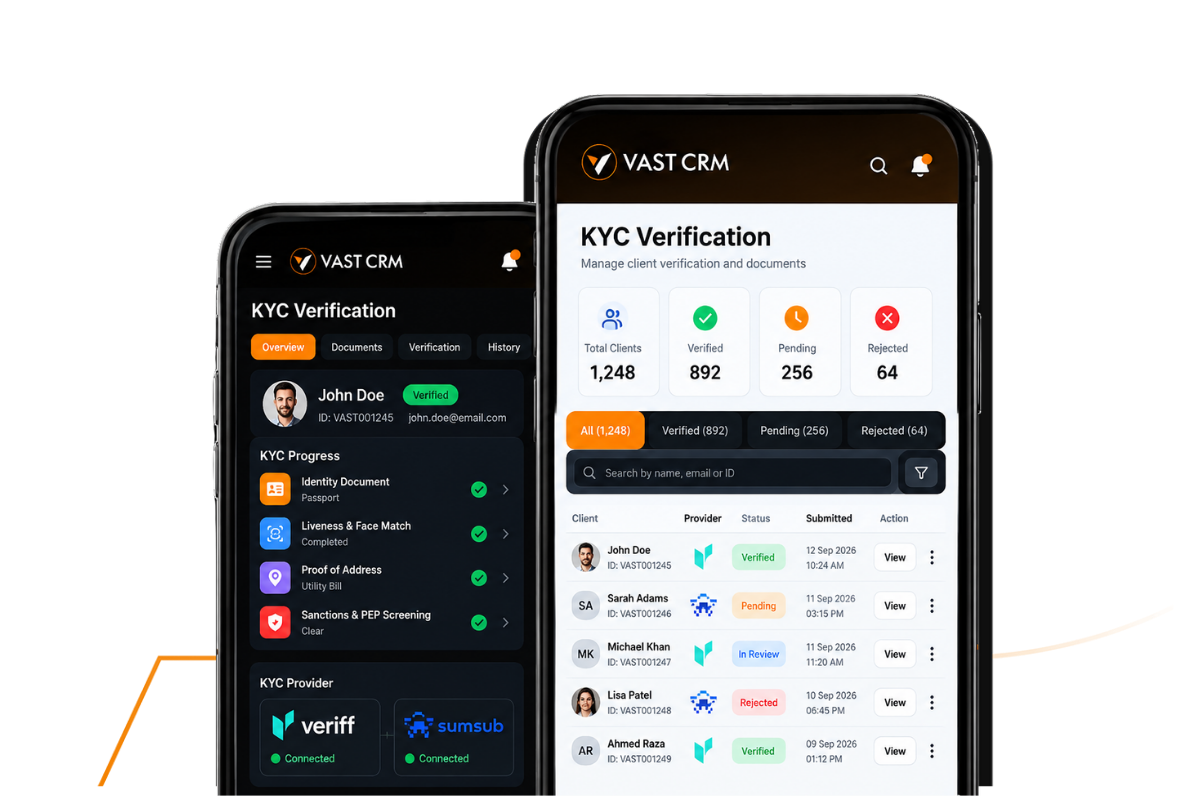
Connect Veriff, Sumsub or your preferred KYC provider with your CRM, or use the built-in KYC module with automated and manual verification workflows.
- Veriff and Sumsub integration
- Connect your preferred provider
- Automated KYC workflows
- Manual verification option
- Client KYC records in CRM
- Verification status tracking
- Your provider, your setup
- Document verification
- Liveness and face match
- Rules and screening workflows
- Review exceptions manually
- KYC history on the client record
What gets checked
Six Checks, One Verification Flow
Review the key information used during client verification, with each result connected to the same KYC record.
-
Identity Documents
Collect and review supported identity documents as part of the client verification process, with document details retained against the relevant KYC record.
-
Liveness & Face Match
Use liveness and face-matching checks to compare the client with the submitted identity document when these verification checks are enabled.
-
Proof of Address
Collect and review address evidence such as supported documents, helping your team verify the residential information provided during onboarding.
-
Sanctions & PEP
Support sanctions and politically exposed person screening as part of the KYC process, based on the checks configured for your verification workflow.
-
Rules by Country
Apply different verification requirements based on the client's country or jurisdiction, so onboarding requirements can follow your operational setup.
-
Exception Review
Bring cases that require additional attention into a review workflow, allowing your team to examine the available information and record the final decision.
Under the hood
KYC That Fits Your Workflow
Use the KYC setup that works for your brokerage, with external providers or the integrated module working through the same CRM environment.
-
Veriff and Sumsub
Connect supported KYC providers to your CRM and keep the resulting verification activity connected to the client onboarding workflow.
-
Your preferred provider
Already working with another KYC provider? We can integrate the required provider into your CRM setup based on your business and technical requirements.
-
Built-in KYC module
Use the integrated KYC module within the CRM when you want verification workflows managed directly inside your existing client onboarding environment.
-
Automated verification
Let configured verification workflows handle eligible cases automatically, reducing repetitive checks and moving completed cases through onboarding faster.
-
Manual review when needed
Keep your team in control when a case needs additional attention, with the option to review information and complete the verification process manually.
-
One CRM record
Keep KYC status and related verification information connected to the client record, giving your team one place to follow onboarding progress.
How it runs
From Signup
To A Verified User
A connected onboarding journey that takes the client from registration to KYC completion without losing the record along the way.
-
The client registers
The client starts the onboarding process and submits the required registration details. Their profile is created in the CRM so the onboarding journey can continue from the same client record.
-
KYC is submitted
The client provides the required verification information through the available KYC workflow. The submitted information stays connected to the client profile for the next stage.
-
The verification starts
The configured KYC workflow processes the submitted information and returns the relevant verification result to the CRM, keeping the onboarding status visible to your team.
-
The case is reviewed
Cases that need additional attention can be reviewed by your team before a final decision is recorded. Automated cases can continue through the configured workflow without unnecessary intervention.
-
The client is approved
Once the required verification process is completed, the client's KYC status is updated in the CRM and the account can move to the next stage of your onboarding process.
-
Ready for the next step
With the verification status recorded against the client, your team can continue with account setup, funding and other brokerage onboarding workflows from the same CRM environment.
Inside your CRM
KYC Visibility, Where Your Team Works
Keep verification information connected to the client profile, so your team can check status, review cases and manage onboarding without switching between separate systems.
- Client KYC status
- Verification records
- Manual case review
- Connected client history
Questions About KYC Integration
Before You Choose Your KYC Setup
Common questions about connecting KYC providers and managing verification through your brokerage CRM.
-
Yes. Veriff and Sumsub are supported integrations, and we can also work with another KYC provider based on your technical and business requirements. The goal is to connect the provider with the CRM so the relevant verification activity can remain part of your client onboarding workflow.
-
Yes. VAST CRM also includes its own integrated KYC module, giving your team a KYC workflow within the CRM environment instead of requiring a separate provider setup for every use case.
-
Yes. The integrated KYC workflow can automate eligible verification steps and update the relevant status in the CRM. This helps reduce repetitive manual work while keeping the verification process connected to the client record.
-
Yes. Manual verification can be used when a case needs additional review or when your internal process requires an operator to check the submitted information before completing the KYC decision.
-
Yes. KYC activity and verification status can remain connected with the relevant client record, giving your team visibility into the onboarding stage without managing the client information across disconnected systems.